Platform
Solutions
Resources
Company
Platform
Solutions
Resources
Company

Nick Morgan
∙
How to Implement Passwordless Authentication: A Practical Guide for Enterprise Security Teams

Nick Morgan
∙
How to Implement Passwordless Authentication: A Practical Guide for Enterprise Security Teams
Nick Morgan
∙
How to Implement Passwordless Authentication: A Practical Guide for Enterprise Security Teams
What Is Passwordless Authentication Implementation?
Passwordless authentication implementation is the process of replacing password-based login flows with cryptographic methods that require no password creation, storage, or submission.
In enterprise environments, this means selecting an authentication architecture, integrating it with existing IAM and SSO infrastructure, enrolling users, and migrating away from legacy credential stores through a phased rollout.
The critical planning decision most organizations miss: eliminating the password while retaining the username closes only half the attack surface.
Usernames stored in directories are breach targets. They enable credential stuffing, account enumeration, and phishing. A complete implementation eliminates both.
The Passwordless Spectrum: What Are You Actually Implementing?
Not all passwordless approaches carry the same security value. Before selecting a solution, map your options against what they actually eliminate.
Approach | Password Eliminated | Username Eliminated | Phishing Resistant | Centralized Credential Store |
|---|---|---|---|---|
Magic links / OTP | Yes | No | No | Yes |
FIDO2 Passkeys | Yes | No | Yes | Yes (username) |
WWPass Zero-Knowledge | Yes | Yes | Yes | No |
Magic links and OTPs replace the password with a code sent via email or SMS. The username is still required to initiate login. This trades one phishable factor for another and does not reduce your directory attack surface.
FIDO2 passkeys use public key cryptography with a domain-bound challenge. The private key never leaves the device, making passkeys phishing-resistant. However, most passkey flows still begin with a username lookup, meaning your directory still holds identifiers that can be breached or enumerated.
WWPass zero-knowledge authentication eliminates both. A Protected User Identifier (PUID) is generated per service, encrypted with the user’s WWPass Key, and cannot be reused, correlated across applications, or reconstructed without the physical key. WWPass itself has no visibility into user identities.
Pre-Implementation Assessment: What to Audit First

Before selecting a solution or writing an integration plan, security teams need an honest inventory of the current environment.
Audit Area | What to Document |
|---|---|
Directory services | Active Directory, LDAP structure, user population size |
SSO platforms | Okta, Azure AD, Ping Identity, supported protocols |
Applications | Which support SAML, OIDC, RADIUS, LDAP, Kerberos; which require SDK integration |
VPN / remote access | Gateway type, RADIUS support |
Compliance requirements | NIST 800-63 AAL level required, GDPR, HIPAA, PSD2, PCI DSS applicability |
Legacy applications | Form-based login apps with no federation protocol support |
User population segmentation is equally important before rollout planning. Divide users into at minimum three groups: privileged administrators (prioritize hardware key deployment for AAL3), standard employees (mobile key candidates), and external users or customers (require separate onboarding and recovery workflows).
Choosing the Right Architecture: A Decision Framework
Threat You Are Solving | Recommended Architecture |
|---|---|
Phishing of password credentials | FIDO2 passkeys or WWPass |
Credential stuffing via breached username lists | WWPass (usernameless) |
Insider threat / vendor with credential access | WWPass zero-knowledge |
NIST AAL3 compliance requirement | WWPass hardware key with PIN/biometric |
Cross-platform, any-device access | WWPass (universal browser and hardware support) |
Regulated industry with data minimization requirements | WWPass (no central credential store) |
WWPass technical architecture: When a user authenticates, the WWPass Key and the service provider ID generate a one-time cryptographic ticket valid for a single session. Data is encrypted and split across 12 geographically distributed nodes using Reed-Solomon dispersion (6,12). At least 6 nodes must be available to reconstruct any data, and a compromised individual node yields nothing usable. The PUID ensures the same user presents a different, uncorrelated identifier to every service.
How to Implement Passwordless Authentication: Phased Rollout
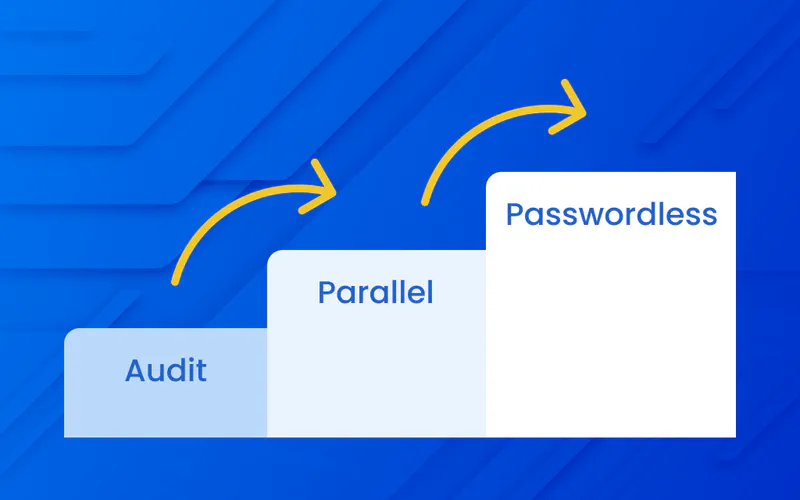
Phase 0: Audit and Baseline
Complete the infrastructure inventory above. Establish baseline metrics you will measure against post-implementation:
Volume of credential-related helpdesk tickets (password resets, lockouts)
Phishing-related incidents in the past 12 months
Current MFA adoption rate across user population
Mean time to provision access for new hires
Finalize integration architecture for each target system. Identify legacy applications requiring SDK integration. Define key issuance, distribution, and recovery workflows before any keys reach users.
Phase 1: Parallel Deployment
Deploy WWPass authentication alongside existing login flows. Users can authenticate via either method during this phase. This reduces cutover risk and surfaces integration issues before the legacy path is removed.
Use this phase to enroll users, distribute WWPass Keys in chosen form factors, and run helpdesk staff through key recovery and revocation procedures. Incentivize adoption through UX improvements rather than mandate. Users default to the passwordless method quickly once enrolled because friction is lower than password-based login.
Phase 2: Legacy Login Disabled
Once adoption crosses a defined threshold (typically 90% or higher) and integration testing is complete, disable username and password login. Force-enroll any remaining users at their next login attempt.
Remove the username field from all login interfaces. The login screen presents only the WWPass authentication option. There is no identifier to harvest, no password to phish, and no credential database to breach.
Integration with Existing IAM and SSO Infrastructure
WWPass does not require replacing existing IAM infrastructure. It integrates as an identity provider layer within your current stack.
Protocol | Use Case | Integration Effort |
|---|---|---|
SAML 2.0 | SSO platforms (Okta, Azure AD, Ping) | Low: configure IdP connector |
OIDC | Modern web apps and cloud services | Low: configure IdP connector |
OAuth2 | API and cloud service authentication | Low to medium |
RADIUS | VPN gateways, network access control | Medium: proxy configuration |
LDAP | On-premises apps, Active Directory | Medium |
Kerberos | On-premises enterprise environments | Medium |
WWPass SDK | Legacy apps with no federation support | Higher: direct integration |
The SAML and OIDC integrations are the most common enterprise path. The authentication event occurs within WWPass, and the resulting assertion passes to your SSO platform, which handles downstream application access. Existing role mappings and access policies remain unchanged.
Key Management and User Enrollment at Scale
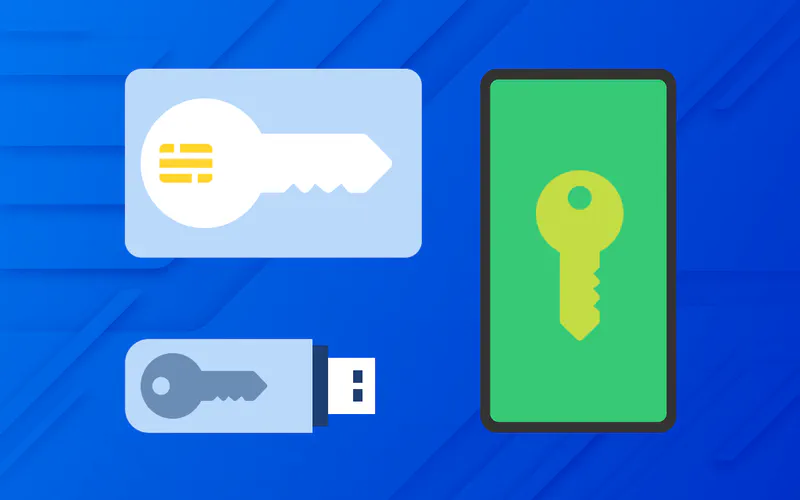
Form factors. The WWPass Key is available as a mobile app (iOS and Android), a smartcard, or a USB and NFC hardware token. Enterprise deployments typically offer multiple form factors based on user role and security requirements.
Self-service recovery. Users hold a second Service Key used exclusively for key management. If the primary WWPass Key is lost, the user uses the Service Key to revoke it and issue a replacement, restoring access without IT intervention. This eliminates a significant volume of helpdesk requests that typically accompany authentication transitions.
Separation of duties. Administrators can manage system access and review audit logs but cannot access user keys or decrypt user data. This satisfies compliance requirements under GDPR, HIPAA, and NIST and protects against insider threat scenarios.
How to Measure Implementation Success
Metric | What It Measures |
|---|---|
Credential helpdesk ticket volume | Password resets and lockouts eliminated |
Phishing-related incidents | Credential compromise attempts |
Credential stuffing attempts | Automated attacks with no viable inputs |
MFA adoption rate | Enrollment completeness by user segment |
Time to provision new hires | Enrollment efficiency vs. pre-implementation |
Audit log completeness | Compliance readiness |
Documented enterprise deployments using WWPass have reported a 20% reduction in security administrative effort and a 5% improvement in staff productivity attributable specifically to eliminating password reset workflows.
Common Implementation Pitfalls
Partial passwordless. Eliminating the password but keeping the username leaves identifiers in your directory vulnerable to enumeration, credential stuffing, and targeted phishing. Address the full attack surface.
No cross-device strategy. Device-bound authentication creates business continuity risk when users lose or replace devices. Plan for cross-device use cases before go-live.
Recovery workflows as an afterthought. Zero-knowledge architectures cannot reset credentials by design. User-controlled recovery must be part of the enrollment process from day one, not a gap discovered post-launch.
Underestimating legacy app complexity. Applications predating modern federation protocols require SDK integration or gateway proxies. Identify and scope these in Phase 0, not during rollout.
Frequently Asked Questions
What is the difference between passwordless and usernameless authentication?
Passwordless eliminates the password. Usernameless eliminates both the password and the username. Most current passwordless solutions remain username-dependent, meaning user identifiers are still stored centrally and remain breach targets.
How long does a passwordless authentication implementation take?
A documented enterprise SaaS deployment using WWPass completed full implementation, including architecture, development, and testing, in approximately two months.
Does implementation require replacing existing SSO infrastructure?
No. WWPass integrates as an external identity provider via SAML or OIDC within existing SSO platforms. Application integrations, role mappings, and access policies remain in place.
What happens if a user loses their WWPass Key?
The user uses their Service Key to revoke the lost key and issue a replacement. Access is restored without IT intervention and without exposing any credentials to the recovery process.
Does WWPass meet NIST 800-63 requirements?
Yes. WWPass with hardware keys meets Authentication Assurance Level 3 (AAL3), the highest level defined by NIST 800-63B, requiring cryptographic hardware with PIN or biometric verification.
Next Steps
WWPass provides a zero-knowledge, usernameless, and passwordless authentication foundation built on 13 global patents. It integrates via SAML, OIDC, OAuth2, RADIUS, LDAP, and Kerberos and meets NIST 800-63, GDPR, PSD2, HIPAA, and PCI DSS compliance requirements without requiring rearchitecture of your existing IAM stack.
To discuss implementation for your organization, visit wwpass.com or contact the WWPass integration team directly.
What Is Passwordless Authentication Implementation?
Passwordless authentication implementation is the process of replacing password-based login flows with cryptographic methods that require no password creation, storage, or submission.
In enterprise environments, this means selecting an authentication architecture, integrating it with existing IAM and SSO infrastructure, enrolling users, and migrating away from legacy credential stores through a phased rollout.
The critical planning decision most organizations miss: eliminating the password while retaining the username closes only half the attack surface.
Usernames stored in directories are breach targets. They enable credential stuffing, account enumeration, and phishing. A complete implementation eliminates both.
The Passwordless Spectrum: What Are You Actually Implementing?
Not all passwordless approaches carry the same security value. Before selecting a solution, map your options against what they actually eliminate.
Approach | Password Eliminated | Username Eliminated | Phishing Resistant | Centralized Credential Store |
|---|---|---|---|---|
Magic links / OTP | Yes | No | No | Yes |
FIDO2 Passkeys | Yes | No | Yes | Yes (username) |
WWPass Zero-Knowledge | Yes | Yes | Yes | No |
Magic links and OTPs replace the password with a code sent via email or SMS. The username is still required to initiate login. This trades one phishable factor for another and does not reduce your directory attack surface.
FIDO2 passkeys use public key cryptography with a domain-bound challenge. The private key never leaves the device, making passkeys phishing-resistant. However, most passkey flows still begin with a username lookup, meaning your directory still holds identifiers that can be breached or enumerated.
WWPass zero-knowledge authentication eliminates both. A Protected User Identifier (PUID) is generated per service, encrypted with the user’s WWPass Key, and cannot be reused, correlated across applications, or reconstructed without the physical key. WWPass itself has no visibility into user identities.
Pre-Implementation Assessment: What to Audit First
Before selecting a solution or writing an integration plan, security teams need an honest inventory of the current environment.
Audit Area | What to Document |
|---|---|
Directory services | Active Directory, LDAP structure, user population size |
SSO platforms | Okta, Azure AD, Ping Identity, supported protocols |
Applications | Which support SAML, OIDC, RADIUS, LDAP, Kerberos; which require SDK integration |
VPN / remote access | Gateway type, RADIUS support |
Compliance requirements | NIST 800-63 AAL level required, GDPR, HIPAA, PSD2, PCI DSS applicability |
Legacy applications | Form-based login apps with no federation protocol support |
User population segmentation is equally important before rollout planning. Divide users into at minimum three groups: privileged administrators (prioritize hardware key deployment for AAL3), standard employees (mobile key candidates), and external users or customers (require separate onboarding and recovery workflows).
Choosing the Right Architecture: A Decision Framework
Threat You Are Solving | Recommended Architecture |
|---|---|
Phishing of password credentials | FIDO2 passkeys or WWPass |
Credential stuffing via breached username lists | WWPass (usernameless) |
Insider threat / vendor with credential access | WWPass zero-knowledge |
NIST AAL3 compliance requirement | WWPass hardware key with PIN/biometric |
Cross-platform, any-device access | WWPass (universal browser and hardware support) |
Regulated industry with data minimization requirements | WWPass (no central credential store) |
WWPass technical architecture: When a user authenticates, the WWPass Key and the service provider ID generate a one-time cryptographic ticket valid for a single session. Data is encrypted and split across 12 geographically distributed nodes using Reed-Solomon dispersion (6,12). At least 6 nodes must be available to reconstruct any data, and a compromised individual node yields nothing usable. The PUID ensures the same user presents a different, uncorrelated identifier to every service.
How to Implement Passwordless Authentication: Phased Rollout
Phase 0: Audit and Baseline
Complete the infrastructure inventory above. Establish baseline metrics you will measure against post-implementation:
Volume of credential-related helpdesk tickets (password resets, lockouts)
Phishing-related incidents in the past 12 months
Current MFA adoption rate across user population
Mean time to provision access for new hires
Finalize integration architecture for each target system. Identify legacy applications requiring SDK integration. Define key issuance, distribution, and recovery workflows before any keys reach users.
Phase 1: Parallel Deployment
Deploy WWPass authentication alongside existing login flows. Users can authenticate via either method during this phase. This reduces cutover risk and surfaces integration issues before the legacy path is removed.
Use this phase to enroll users, distribute WWPass Keys in chosen form factors, and run helpdesk staff through key recovery and revocation procedures. Incentivize adoption through UX improvements rather than mandate. Users default to the passwordless method quickly once enrolled because friction is lower than password-based login.
Phase 2: Legacy Login Disabled
Once adoption crosses a defined threshold (typically 90% or higher) and integration testing is complete, disable username and password login. Force-enroll any remaining users at their next login attempt.
Remove the username field from all login interfaces. The login screen presents only the WWPass authentication option. There is no identifier to harvest, no password to phish, and no credential database to breach.
Integration with Existing IAM and SSO Infrastructure
WWPass does not require replacing existing IAM infrastructure. It integrates as an identity provider layer within your current stack.
Protocol | Use Case | Integration Effort |
|---|---|---|
SAML 2.0 | SSO platforms (Okta, Azure AD, Ping) | Low: configure IdP connector |
OIDC | Modern web apps and cloud services | Low: configure IdP connector |
OAuth2 | API and cloud service authentication | Low to medium |
RADIUS | VPN gateways, network access control | Medium: proxy configuration |
LDAP | On-premises apps, Active Directory | Medium |
Kerberos | On-premises enterprise environments | Medium |
WWPass SDK | Legacy apps with no federation support | Higher: direct integration |
The SAML and OIDC integrations are the most common enterprise path. The authentication event occurs within WWPass, and the resulting assertion passes to your SSO platform, which handles downstream application access. Existing role mappings and access policies remain unchanged.
Key Management and User Enrollment at Scale
Form factors. The WWPass Key is available as a mobile app (iOS and Android), a smartcard, or a USB and NFC hardware token. Enterprise deployments typically offer multiple form factors based on user role and security requirements.
Self-service recovery. Users hold a second Service Key used exclusively for key management. If the primary WWPass Key is lost, the user uses the Service Key to revoke it and issue a replacement, restoring access without IT intervention. This eliminates a significant volume of helpdesk requests that typically accompany authentication transitions.
Separation of duties. Administrators can manage system access and review audit logs but cannot access user keys or decrypt user data. This satisfies compliance requirements under GDPR, HIPAA, and NIST and protects against insider threat scenarios.
How to Measure Implementation Success
Metric | What It Measures |
|---|---|
Credential helpdesk ticket volume | Password resets and lockouts eliminated |
Phishing-related incidents | Credential compromise attempts |
Credential stuffing attempts | Automated attacks with no viable inputs |
MFA adoption rate | Enrollment completeness by user segment |
Time to provision new hires | Enrollment efficiency vs. pre-implementation |
Audit log completeness | Compliance readiness |
Documented enterprise deployments using WWPass have reported a 20% reduction in security administrative effort and a 5% improvement in staff productivity attributable specifically to eliminating password reset workflows.
Common Implementation Pitfalls
Partial passwordless. Eliminating the password but keeping the username leaves identifiers in your directory vulnerable to enumeration, credential stuffing, and targeted phishing. Address the full attack surface.
No cross-device strategy. Device-bound authentication creates business continuity risk when users lose or replace devices. Plan for cross-device use cases before go-live.
Recovery workflows as an afterthought. Zero-knowledge architectures cannot reset credentials by design. User-controlled recovery must be part of the enrollment process from day one, not a gap discovered post-launch.
Underestimating legacy app complexity. Applications predating modern federation protocols require SDK integration or gateway proxies. Identify and scope these in Phase 0, not during rollout.
Frequently Asked Questions
What is the difference between passwordless and usernameless authentication?
Passwordless eliminates the password. Usernameless eliminates both the password and the username. Most current passwordless solutions remain username-dependent, meaning user identifiers are still stored centrally and remain breach targets.
How long does a passwordless authentication implementation take?
A documented enterprise SaaS deployment using WWPass completed full implementation, including architecture, development, and testing, in approximately two months.
Does implementation require replacing existing SSO infrastructure?
No. WWPass integrates as an external identity provider via SAML or OIDC within existing SSO platforms. Application integrations, role mappings, and access policies remain in place.
What happens if a user loses their WWPass Key?
The user uses their Service Key to revoke the lost key and issue a replacement. Access is restored without IT intervention and without exposing any credentials to the recovery process.
Does WWPass meet NIST 800-63 requirements?
Yes. WWPass with hardware keys meets Authentication Assurance Level 3 (AAL3), the highest level defined by NIST 800-63B, requiring cryptographic hardware with PIN or biometric verification.
Next Steps
WWPass provides a zero-knowledge, usernameless, and passwordless authentication foundation built on 13 global patents. It integrates via SAML, OIDC, OAuth2, RADIUS, LDAP, and Kerberos and meets NIST 800-63, GDPR, PSD2, HIPAA, and PCI DSS compliance requirements without requiring rearchitecture of your existing IAM stack.
To discuss implementation for your organization, visit wwpass.com or contact the WWPass integration team directly.
What Is Passwordless Authentication Implementation?
Passwordless authentication implementation is the process of replacing password-based login flows with cryptographic methods that require no password creation, storage, or submission.
In enterprise environments, this means selecting an authentication architecture, integrating it with existing IAM and SSO infrastructure, enrolling users, and migrating away from legacy credential stores through a phased rollout.
The critical planning decision most organizations miss: eliminating the password while retaining the username closes only half the attack surface.
Usernames stored in directories are breach targets. They enable credential stuffing, account enumeration, and phishing. A complete implementation eliminates both.
The Passwordless Spectrum: What Are You Actually Implementing?
Not all passwordless approaches carry the same security value. Before selecting a solution, map your options against what they actually eliminate.
Approach | Password Eliminated | Username Eliminated | Phishing Resistant | Centralized Credential Store |
|---|---|---|---|---|
Magic links / OTP | Yes | No | No | Yes |
FIDO2 Passkeys | Yes | No | Yes | Yes (username) |
WWPass Zero-Knowledge | Yes | Yes | Yes | No |
Magic links and OTPs replace the password with a code sent via email or SMS. The username is still required to initiate login. This trades one phishable factor for another and does not reduce your directory attack surface.
FIDO2 passkeys use public key cryptography with a domain-bound challenge. The private key never leaves the device, making passkeys phishing-resistant. However, most passkey flows still begin with a username lookup, meaning your directory still holds identifiers that can be breached or enumerated.
WWPass zero-knowledge authentication eliminates both. A Protected User Identifier (PUID) is generated per service, encrypted with the user’s WWPass Key, and cannot be reused, correlated across applications, or reconstructed without the physical key. WWPass itself has no visibility into user identities.
Pre-Implementation Assessment: What to Audit First
Before selecting a solution or writing an integration plan, security teams need an honest inventory of the current environment.
Audit Area | What to Document |
|---|---|
Directory services | Active Directory, LDAP structure, user population size |
SSO platforms | Okta, Azure AD, Ping Identity, supported protocols |
Applications | Which support SAML, OIDC, RADIUS, LDAP, Kerberos; which require SDK integration |
VPN / remote access | Gateway type, RADIUS support |
Compliance requirements | NIST 800-63 AAL level required, GDPR, HIPAA, PSD2, PCI DSS applicability |
Legacy applications | Form-based login apps with no federation protocol support |
User population segmentation is equally important before rollout planning. Divide users into at minimum three groups: privileged administrators (prioritize hardware key deployment for AAL3), standard employees (mobile key candidates), and external users or customers (require separate onboarding and recovery workflows).
Choosing the Right Architecture: A Decision Framework
Threat You Are Solving | Recommended Architecture |
|---|---|
Phishing of password credentials | FIDO2 passkeys or WWPass |
Credential stuffing via breached username lists | WWPass (usernameless) |
Insider threat / vendor with credential access | WWPass zero-knowledge |
NIST AAL3 compliance requirement | WWPass hardware key with PIN/biometric |
Cross-platform, any-device access | WWPass (universal browser and hardware support) |
Regulated industry with data minimization requirements | WWPass (no central credential store) |
WWPass technical architecture: When a user authenticates, the WWPass Key and the service provider ID generate a one-time cryptographic ticket valid for a single session. Data is encrypted and split across 12 geographically distributed nodes using Reed-Solomon dispersion (6,12). At least 6 nodes must be available to reconstruct any data, and a compromised individual node yields nothing usable. The PUID ensures the same user presents a different, uncorrelated identifier to every service.
How to Implement Passwordless Authentication: Phased Rollout
Phase 0: Audit and Baseline
Complete the infrastructure inventory above. Establish baseline metrics you will measure against post-implementation:
Volume of credential-related helpdesk tickets (password resets, lockouts)
Phishing-related incidents in the past 12 months
Current MFA adoption rate across user population
Mean time to provision access for new hires
Finalize integration architecture for each target system. Identify legacy applications requiring SDK integration. Define key issuance, distribution, and recovery workflows before any keys reach users.
Phase 1: Parallel Deployment
Deploy WWPass authentication alongside existing login flows. Users can authenticate via either method during this phase. This reduces cutover risk and surfaces integration issues before the legacy path is removed.
Use this phase to enroll users, distribute WWPass Keys in chosen form factors, and run helpdesk staff through key recovery and revocation procedures. Incentivize adoption through UX improvements rather than mandate. Users default to the passwordless method quickly once enrolled because friction is lower than password-based login.
Phase 2: Legacy Login Disabled
Once adoption crosses a defined threshold (typically 90% or higher) and integration testing is complete, disable username and password login. Force-enroll any remaining users at their next login attempt.
Remove the username field from all login interfaces. The login screen presents only the WWPass authentication option. There is no identifier to harvest, no password to phish, and no credential database to breach.
Integration with Existing IAM and SSO Infrastructure
WWPass does not require replacing existing IAM infrastructure. It integrates as an identity provider layer within your current stack.
Protocol | Use Case | Integration Effort |
|---|---|---|
SAML 2.0 | SSO platforms (Okta, Azure AD, Ping) | Low: configure IdP connector |
OIDC | Modern web apps and cloud services | Low: configure IdP connector |
OAuth2 | API and cloud service authentication | Low to medium |
RADIUS | VPN gateways, network access control | Medium: proxy configuration |
LDAP | On-premises apps, Active Directory | Medium |
Kerberos | On-premises enterprise environments | Medium |
WWPass SDK | Legacy apps with no federation support | Higher: direct integration |
The SAML and OIDC integrations are the most common enterprise path. The authentication event occurs within WWPass, and the resulting assertion passes to your SSO platform, which handles downstream application access. Existing role mappings and access policies remain unchanged.
Key Management and User Enrollment at Scale
Form factors. The WWPass Key is available as a mobile app (iOS and Android), a smartcard, or a USB and NFC hardware token. Enterprise deployments typically offer multiple form factors based on user role and security requirements.
Self-service recovery. Users hold a second Service Key used exclusively for key management. If the primary WWPass Key is lost, the user uses the Service Key to revoke it and issue a replacement, restoring access without IT intervention. This eliminates a significant volume of helpdesk requests that typically accompany authentication transitions.
Separation of duties. Administrators can manage system access and review audit logs but cannot access user keys or decrypt user data. This satisfies compliance requirements under GDPR, HIPAA, and NIST and protects against insider threat scenarios.
How to Measure Implementation Success
Metric | What It Measures |
|---|---|
Credential helpdesk ticket volume | Password resets and lockouts eliminated |
Phishing-related incidents | Credential compromise attempts |
Credential stuffing attempts | Automated attacks with no viable inputs |
MFA adoption rate | Enrollment completeness by user segment |
Time to provision new hires | Enrollment efficiency vs. pre-implementation |
Audit log completeness | Compliance readiness |
Documented enterprise deployments using WWPass have reported a 20% reduction in security administrative effort and a 5% improvement in staff productivity attributable specifically to eliminating password reset workflows.
Common Implementation Pitfalls
Partial passwordless. Eliminating the password but keeping the username leaves identifiers in your directory vulnerable to enumeration, credential stuffing, and targeted phishing. Address the full attack surface.
No cross-device strategy. Device-bound authentication creates business continuity risk when users lose or replace devices. Plan for cross-device use cases before go-live.
Recovery workflows as an afterthought. Zero-knowledge architectures cannot reset credentials by design. User-controlled recovery must be part of the enrollment process from day one, not a gap discovered post-launch.
Underestimating legacy app complexity. Applications predating modern federation protocols require SDK integration or gateway proxies. Identify and scope these in Phase 0, not during rollout.
Frequently Asked Questions
What is the difference between passwordless and usernameless authentication?
Passwordless eliminates the password. Usernameless eliminates both the password and the username. Most current passwordless solutions remain username-dependent, meaning user identifiers are still stored centrally and remain breach targets.
How long does a passwordless authentication implementation take?
A documented enterprise SaaS deployment using WWPass completed full implementation, including architecture, development, and testing, in approximately two months.
Does implementation require replacing existing SSO infrastructure?
No. WWPass integrates as an external identity provider via SAML or OIDC within existing SSO platforms. Application integrations, role mappings, and access policies remain in place.
What happens if a user loses their WWPass Key?
The user uses their Service Key to revoke the lost key and issue a replacement. Access is restored without IT intervention and without exposing any credentials to the recovery process.
Does WWPass meet NIST 800-63 requirements?
Yes. WWPass with hardware keys meets Authentication Assurance Level 3 (AAL3), the highest level defined by NIST 800-63B, requiring cryptographic hardware with PIN or biometric verification.
Next Steps
WWPass provides a zero-knowledge, usernameless, and passwordless authentication foundation built on 13 global patents. It integrates via SAML, OIDC, OAuth2, RADIUS, LDAP, and Kerberos and meets NIST 800-63, GDPR, PSD2, HIPAA, and PCI DSS compliance requirements without requiring rearchitecture of your existing IAM stack.
To discuss implementation for your organization, visit wwpass.com or contact the WWPass integration team directly.

Get WWPass
Download the WWPass Key app and test authentication without a username or password.
Get WWPass
Download the WWPass Key app and test authentication without a username or password.
